Watch your Mac app change, screen by screen.

Let your agent press native controls, wait for the expected state and retain named window captures with accessibility snapshots. The MacOSApp guest executor runs these journeys inside source-installed SwiftVM guests, so your agent can compare what changed without taking over your desktop.

reflow / MacOSApp · disk-usage appRecorded runs
Recorded macOS actionsLine 14 · selected step
  1. waitFor gigahog.plot · present
  2. expect gigahog.breadcrumb.item.0 · “reflow-demo”
  3. expect gigahog.mode.flame · present
  4. waitFor gigahog.plot · present
  5. press “Projects, 33.6 MB”
  6. waitFor “alpha, 25.2 MB” · present
  7. expect gigahog.breadcrumb.item.1 · present
  8. press gigahog.breadcrumb.item.0 · “reflow-demo”
  9. waitFor gigahog.breadcrumb.item.1 · absent
  10. # Presentation: compare base and injected-change runs

Recorded MacOSApp actions, grouped by named capture. Comparison comments describe this presentation, not runtime commands. Select a checkpoint line to inspect its output; preceding lines provide context.

Output · selected step
J01 launch-root · 4 actionsapp.run
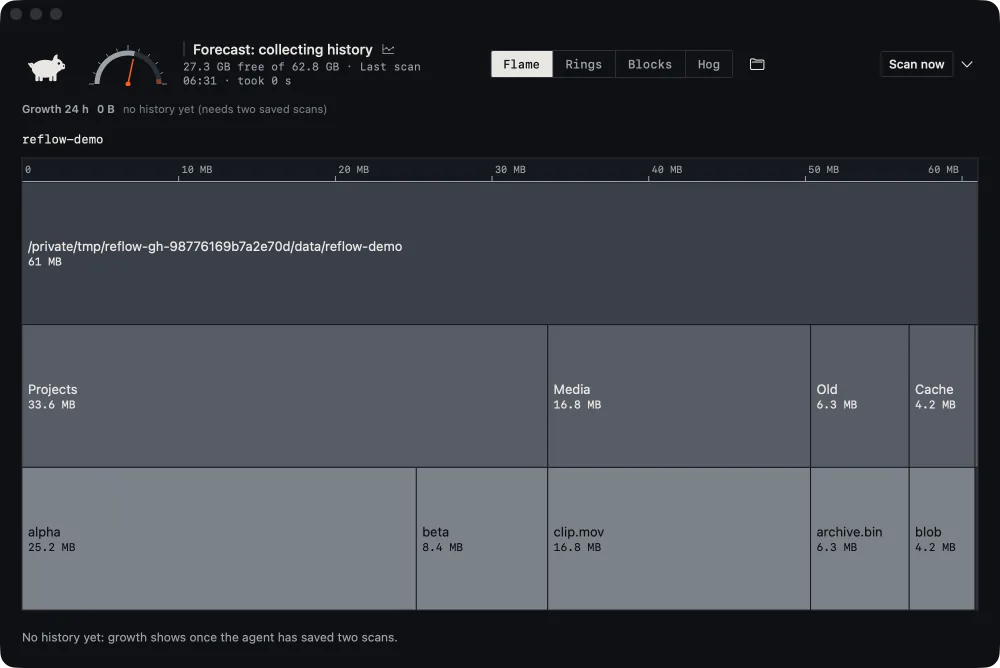
Window capture “launched”: a flame view of the synthetic reflow-demo folder, 61 MB, split into Projects, Media, Old and Cache. Numbered outlines mark the disk gauge, the Flame button, the breadcrumb and the plot.
Checkpoint “launched” · window/launched-1.pngView capture
Inspect accessibilityax/launched.json
  1. AXWindow main
  2. 1AXUnknown “Disk 56 percent full”
  3. AXGroup “View” gigahog.mode
  4. 2AXButton “Flame” selected gigahog.mode.flame
  5. 3AXStaticText “reflow-demo” gigahog.breadcrumb.item.0
  6. 4AXGroup “Flame view of /private/tmp/reflow-gh-ff4b01362b0e28a7/data/reflow-demo, 61 MB. Largest: Projects 33.6 MB, Media 16.8 MB, Old 6.3 MB, Cache 4.2 MB.” gigahog.plot
  7. AXButton “Projects, 33.6 MB”

7 of 34 nodes, from another run of this build

Retained by this run
  • timeline.json
  • window/launched-1.png
J03 zoom-and-back · actions 1–5 of 8app.run
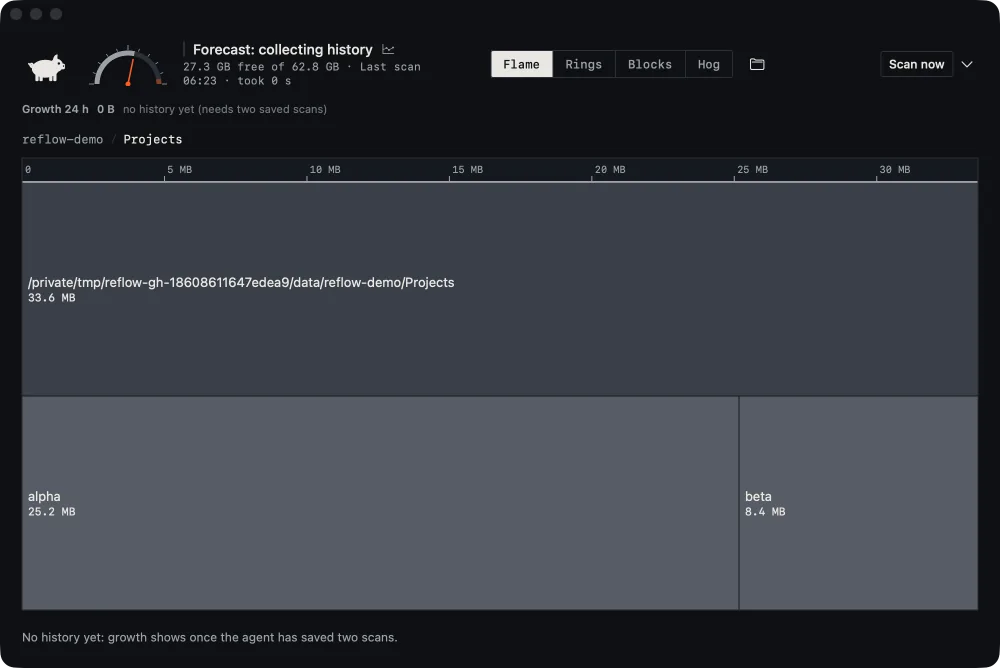
Window capture “zoomed”: the Projects folder, 33.6 MB, fills the view with alpha, 25.2 MB, and beta, 8.4 MB, below it. The breadcrumb reads reflow-demo / Projects.
Checkpoint “zoomed” · window/zoomed-1.pngView capture
Inspect accessibilityaction targets · result.json
  1. AXButton “Projects, 33.6 MB” pressed gigahog.plot.block./private/tmp/reflow-gh-18608611647edea9/data/reflow-demo/Projects
  2. AXButton “alpha, 25.2 MB” present gigahog.plot.block./private/tmp/reflow-gh-18608611647edea9/data/reflow-demo/Projects/alpha
  3. AXStaticText “Projects” present gigahog.breadcrumb.item.1
Retained by this run
  • timeline.json
  • ax/002-after.json
  • window/zoomed-1.png
J03 zoom-and-back · actions 6–8 of 8app.run
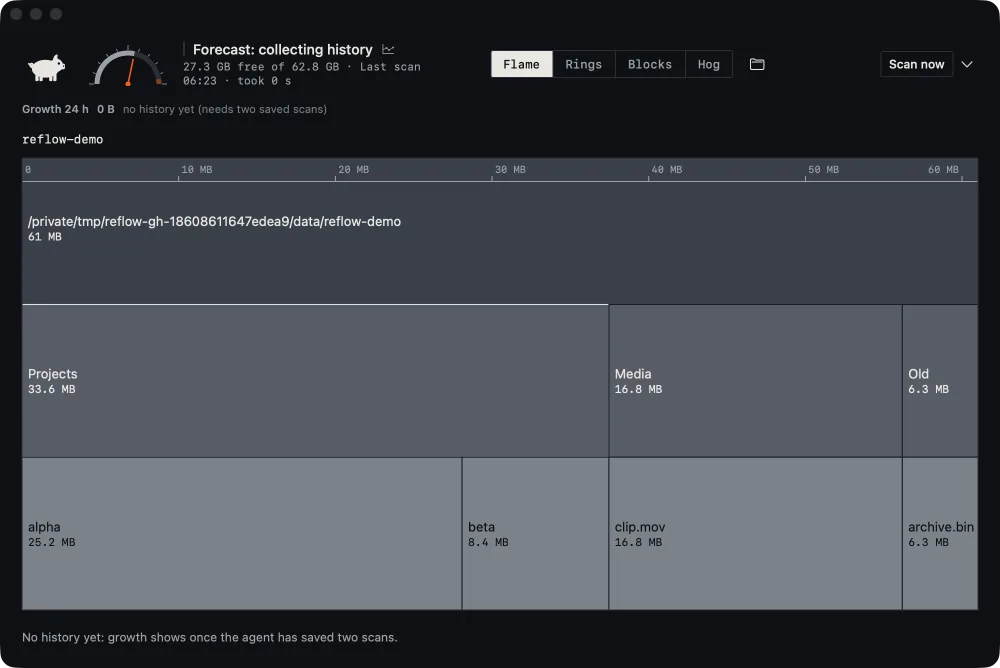
Window capture “back”: the flame view has returned to the whole reflow-demo folder, 61 MB.
Checkpoint “back” · window/back-1.pngView capture
Inspect accessibilityaction targets · result.json
  1. AXButton “reflow-demo” pressed gigahog.breadcrumb.item.0
  2. gigahog.breadcrumb.item.1 absent

The app quit through its own Quit command; cleanup confirmed.

Retained by this run
  • timeline.json
  • ax/002-after.json
  • ax/006-after.json
  • window/zoomed-1.png
  • window/back-1.png
J03 zoom-and-back · base build vs injected changecompare
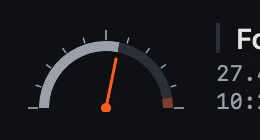
The “zoomed” capture with the changed 24 by 47 pixel region outlined on the disk gauge needle.
window/zoomed-1.png24×47 px at 244,117
Run comparison6 artifacts
window/zoomed-1.png
Changed 0.27% of pixels, one 24×47 px region
window/back-1.png
Changed 0.22% of pixels, the same region
4 accessibility snapshots
Same scan times and temporary paths normalized
8 actions
Passed in both runs
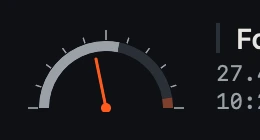
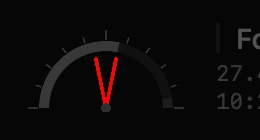
Base build: the gauge needle leans right of centre.
Base build
Injected change: the needle is mirrored and leans left of centre.
Injected change
Changed pixels: both needle positions marked over a dimmed capture.
Changed pixels
Agent review · example interpretation

Every step passed. The gauge did not. The accessibility snapshots match, but the needle is drawn mirrored: the disk is more than half full and the needle now leans left. Was the gauge drawing meant to change?

Real MacOSApp window captures and accessibility snapshots from QA runs of Gigahog, a disk-usage app in development, on synthetic folders. Screens from separate runs of one build are shown in sequence; before each press, the run’s other root or zoomed capture stands in for the screen. The needle change was injected on purpose; its crops come from one round of that exercise and the comparison figures from a repeat, outlined here on another run’s capture. The guest executor is used inside source-installed SwiftVM guests; the standalone host provider is a separate development candidate. MacOSApp is not bundled with the public CLI.

Act like a person. Keep what the app showed.

A scenario presses buttons, sets values and waits for elements to appear or disappear before it takes a named capture. Each run launches a test copy of your app, quits it through its own Quit command and confirms that every process it started has stopped.

  • Named window captures
  • Accessibility snapshots
  • Each action’s outcome and how the app stopped

Read the pixels and the outline together.

A screen can change while no accessibility text does: a gauge, a chart, an icon or a colour. Keeping the window capture beside its accessibility snapshot lets your agent tell a redrawn control from a renamed or missing one.

In a QA exercise, a deliberately injected change mirrored a disk gauge’s needle. Every step passed and the accessibility snapshots matched; the compared captures differed in one small region. Your agent can bring both captures into review and ask whether the drawing was meant to change.

Bring the evidence into PR review

Press, wait, then capture a named window

The MacOSApp guest executor has run real app journeys inside SwiftVM through Reflow. It receives Accessibility and Screen Recording permissions from the provisioned guest agent, with a preflight check in each clone. MacOSApp is not bundled with the public CLI. The standalone host provider and its source-catalog recipe are a separate development path; guest execution does not establish that host installation is accepted.

The MacOSApp guest executor is used inside source-installed SwiftVM guests. The standalone host provider remains a separate development candidate; this app.run excerpt describes its interface, not a bundled installation recipe.

Flow excerptMacOSApp
---
providers:
  app: MacOSApp
---

app.run scenario="{\"version\":1,\"actions\":[{\"do\":\"press\",\"selector\":{\"role\":\"AXButton\",\"label\":\"Blocks\"}},{\"do\":\"waitFor\",\"state\":\"present\",\"selector\":{\"identifier\":\"mode-label\"},\"value\":\"Mode: Blocks\"},{\"do\":\"capture\",\"name\":\"blocks\"}]}"

Plugin requirements and private connection settings are configured separately.

Check the rest
of the application.